LoRA training
Train a Krea 2 LoRA locally
Krea 2 is the architecture to reach for if you have the choice. It is the only one of the three that sidesteps distillation entirely: you train on the undistilled RAW base, so there is nothing to fuse and nothing to drift. A 4-bit frozen base brings the 26GB model down to about 12GB at 512px, so a 16GB card can train a LoRA for a model far larger than it could hold at full precision.
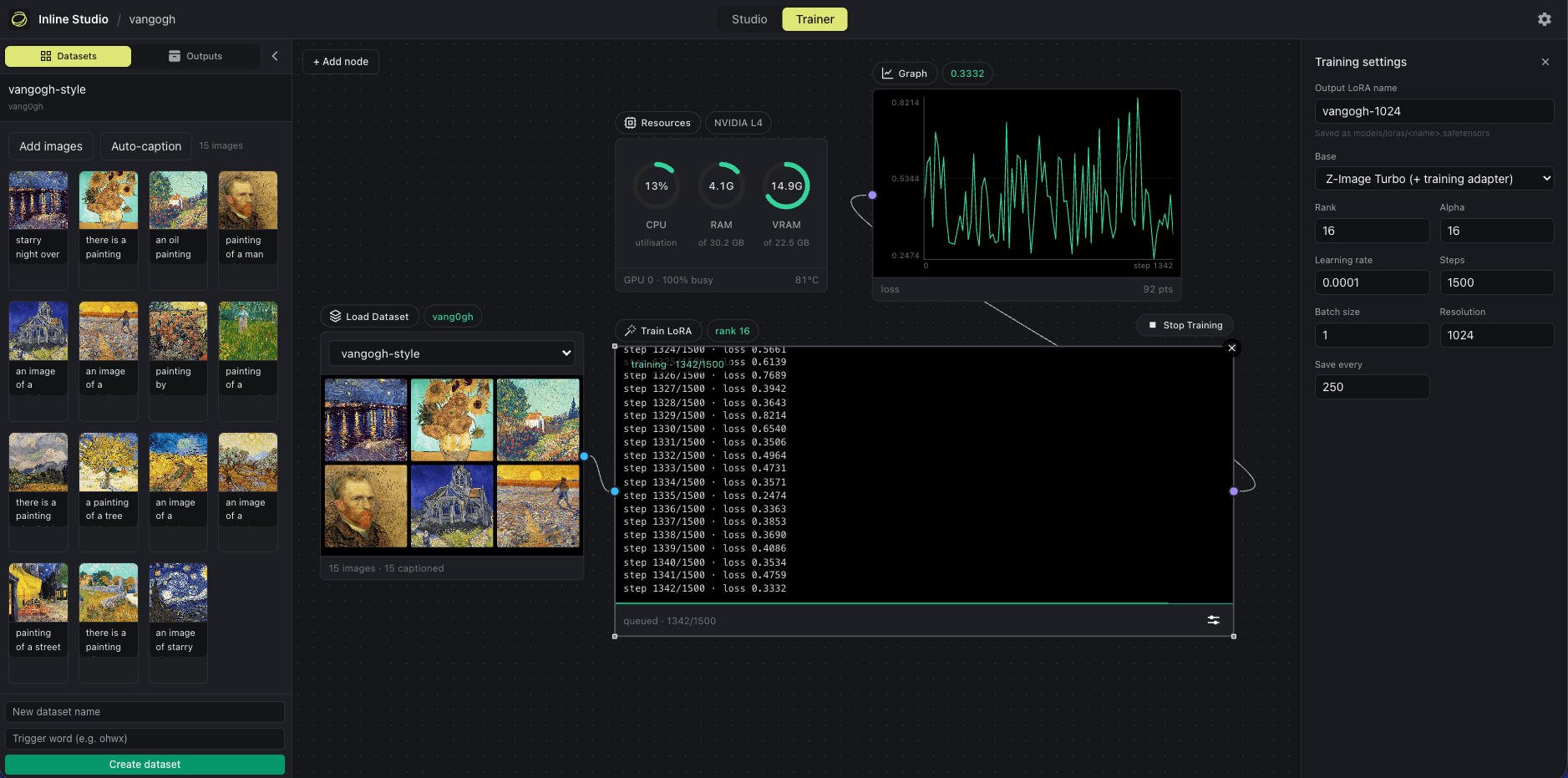
The Trainer canvas. The run pictured is a Z-Image LoRA, and the graph is the same shape for every architecture.
Which base to train on
Pick the architecture in the Trainer's Adjust panel, then a base within it. Training directly on a step-distilled checkpoint breaks the distillation down, so every architecture offers a way around that.
Krea 2 RAW
The undistilled base, and the recommended path. Nothing to fuse, nothing to drift. Train on it, then generate with the Krea 2 Turbo node: the LoRA carries over unchanged. This is what our published skin LoRA trained on.
Krea 2 Turbo plus training adapter
For people who only hold Turbo. Drop the ostris Krea 2 training adapter in models/loras/, or point INLINE_KREA2_TRAIN_ADAPTER at it. The adapter is free in VRAM terms: it is fused into the base before training starts, so this path and the undistilled base peak at exactly the same number.
What the trainer needs on disk: krea2_raw_bf16.safetensors, in models/diffusion_models/. Nothing is downloaded behind your back, and a run that is missing a file stops and names it.
Krea 2 LoRA training VRAM, measured
Peak allocation at 12 steps, rank 16, batch 1, with gradient checkpointing on. The number is torch.cuda.max_memory_allocated, so leave headroom for the CUDA context and allocator slack.
| Configuration | L40S (46GB) | T4 (15GB) |
|---|---|---|
| 512px, 4-bit base | 11.7GB | 11.9GB |
| 512px, bf16 base | 30.4GB | out of memory |
| 1024px, 4-bit base | 27.8GB | out of memory |
| 1024px, bf16 base | out of memory | out of memory |
Krea 2's base is 26GB at bf16, which is what makes it expensive to fine-tune. Base precision set to 4-bit freezes that base at NF4 while the LoRA itself stays full precision, the QLoRA arrangement, so only the frozen base loses fidelity. Leave the setting on Auto and it sizes the base plus its activations at your chosen resolution against your card and picks for you.
See the full matrix in the README, or compare all three architectures.
How long a run takes
- On an L40S the 12-step benchmark takes 192s on RAW at 512px with a 4-bit base, and 219s through the Turbo adapter. The same work takes 824s and 872s on a T4, because Turing has no native bf16 and runs it about four times slower.
- A full 1500-step run is roughly 40 minutes on an L40S and about 3 hours on a T4.
- System RAM stays low. Checkpoints are read tensor by tensor rather than mapped whole, so Krea 2 trains in about 3GB of host RAM.
Krea 2 LoRA training FAQ
Can I train a Krea 2 LoRA on a 16GB GPU?
Yes, at 512px with the 4-bit base. It peaks at 11.9GB measured on a Tesla T4, so it fits a 16GB card with headroom for the CUDA context. Krea 2 at 1024px needs roughly 32GB and no setting closes that gap, because activations scale with image tokens and gradient checkpointing and memory-efficient attention are already on. Train at 512 instead: a LoRA trained at 512 still applies at any generation resolution.
Do I train on Krea 2 RAW or Krea 2 Turbo?
RAW, if you have it. Training directly on a step-distilled checkpoint breaks the distillation down, which is the turbo drift problem. RAW is undistilled, so there is nothing to drift, and the finished LoRA carries over to the Krea 2 Turbo node unchanged. If you only hold Turbo, the training adapter gets you the same result and costs nothing in VRAM.
How long does a Krea 2 LoRA take to train?
A 1500-step run is roughly 40 minutes on an L40S and about 3 hours on a Tesla T4. The gap is the card rather than the model: Turing has no native bf16, so a T4 runs the same work about four times slower.
Does the 4-bit base hurt quality?
Only the frozen base is quantized. The LoRA itself trains at full precision, which is the QLoRA arrangement. Our published skin LoRA was trained on this path and its samples are on the model card if you want to judge the result rather than take the claim.
Train your first Krea 2 LoRA
Free and open source. Runs on macOS, Windows, and Linux.