Built with Inline Studio
Circuit Race: Animated Short Film with LTX 2.3 and GPT Image Generation
A step-by-step tutorial for turning a single creative idea into a finished animated short, using open-source video generation and AI image models.
- GPT2 image generation
- LTX 2.3
- Premiere Pro
Building an Animated Short Film with LTX 2.3 and GPT Image Generation
A step-by-step tutorial for turning a single creative idea into a finished animated short, using open-source video generation and AI image models.
Overview
This tutorial walks through producing a 20-second cinematic racing short film entirely from AI tools. The pipeline is simple and repeatable:
- Storyboard the film as rough pencil panels using GPT text-to-image.
- Generate assets and characters for visual consistency across shots.
- Animate each shot by passing stills through LTX 2.3 image-to-video.
- Edit and combine the clips into the final cut.
What You Need
- A GPT-based text-to-image model for generating stills.
- LTX 2.3 (open source) for image-to-video generation.
- A video editor of your choice for the final assembly.
- The ComfyUI workflows referenced in each step.
The Pipeline at a Glance
Idea
  -> Storyboard panels        (GPT text to image)
  -> Character + asset sheet   (GPT text to image)
  -> Per-shot still            (GPT text to image)
  -> Per-shot video clip       (LTX 2.3 image to video)
  -> Final edit                (video editor)
Each shot follows the same loop: generate a still, then animate it. Consistency comes from reusing your character and asset references at every stage.
Car Racing Storyline
Step 1: Storyboard Generation
Start by generating a full storyboard sheet. This gives you the shot list, framing, and pacing before committing any time to animation. Use rough pencil-sketch styling so the output reads as pre-production art rather than finished frames.
Prompt
> Create a raw cinematic film storyboard sheet drawn by a professional storyboard artist. Very rough pencil sketches, loose hand-drawn lines, unfinished drawings, visible construction lines, messy graphite strokes, sketchbook quality, quick gesture drawings, rough shading, cross-hatching, production pre-visualization art, not polished concept art.
A 20-second racing short film.
Main Character:
Young male race driver with curly hair, freckles, strong eyebrows, wearing a professional racing suit and white racing helmet.
Vehicle:
Customized white and red sports car, realistic modified track car.
Storyboard Panels:
1. Wide establishing shot. A young race driver enters a motorsport garage carrying a white helmet. His customized white and red sports car waits under workshop lights.
2. Medium shot. The driver stands beside the sports car, studying it before the race.
3. Close-up of the driver's hand running across the car's bodywork.
4. The driver opens the car door.
5. The driver sits inside the cockpit and puts on the helmet.
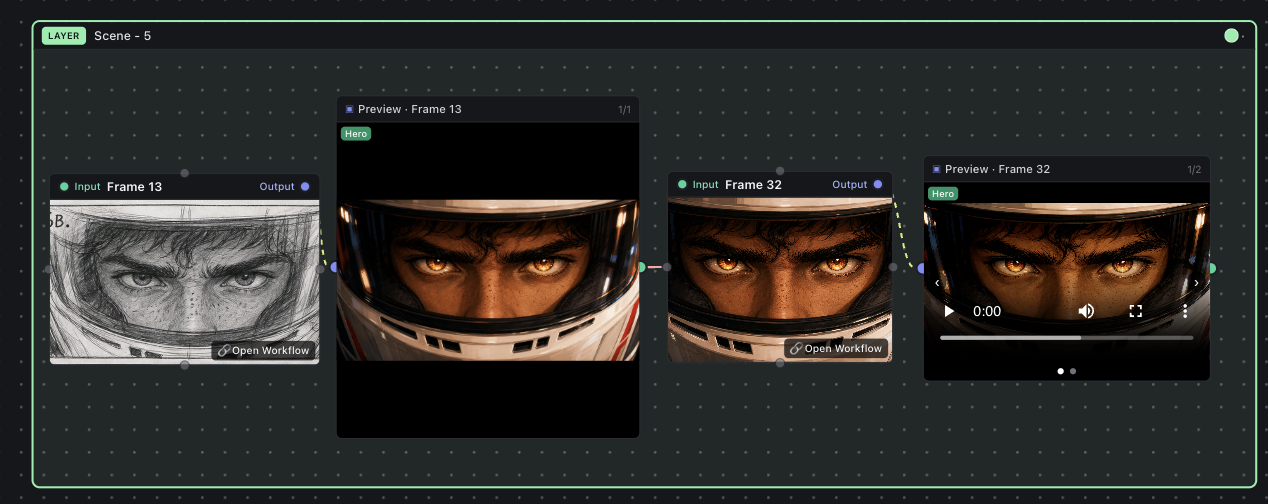
6A. Extreme close-up through the helmet visor. The driver's eyes appear emotional, reflective and vulnerable.
6B. Same composition and camera angle. The driver's eyes now burn with determination and focus.
7. Portrait shot of a beautiful young woman. Soft expression, gentle smile, dreamlike memory sequence.
8. Sports cars lined up on a professional racing circuit at the starting grid.
9. Race launch. Sports cars accelerate aggressively from the starting line.
10. Driver POV from inside the cockpit chasing rival cars at high speed.
11. Side-by-side battle between sports cars on a racing circuit.
12. Extreme close-up of spinning performance tires gripping the asphalt at high speed.
13. Dynamic aerial shot of the white and red sports car attacking a corner.
14. Dramatic overtake maneuver for first place.
15. The white and red sports car crosses the finish line in first position.
16. Close-up of the driver inside the helmet after victory. Calm, relieved and proud expression.
17. Final hero shot. The victorious sports car drives into the distance on the racing circuit.
Style:
Very rough storyboard sketches, black and white graphite pencil drawing, movie director storyboard notebook, production planning sketches, quick gesture drawing style, cinematic camera framing, camera direction arrows, movement arrows, thumbnail storyboard quality, loose linework, unfinished pencil art, pre-production artwork pinned on a studio wall.
Avoid:
color, digital painting, polished concept art, comic book style, anime style, logos, branding, sponsor decals, racing numbers, text overlays, watermarks, rain, puddles, wet roads, storm clouds, water spray.
GPT Text to Image output
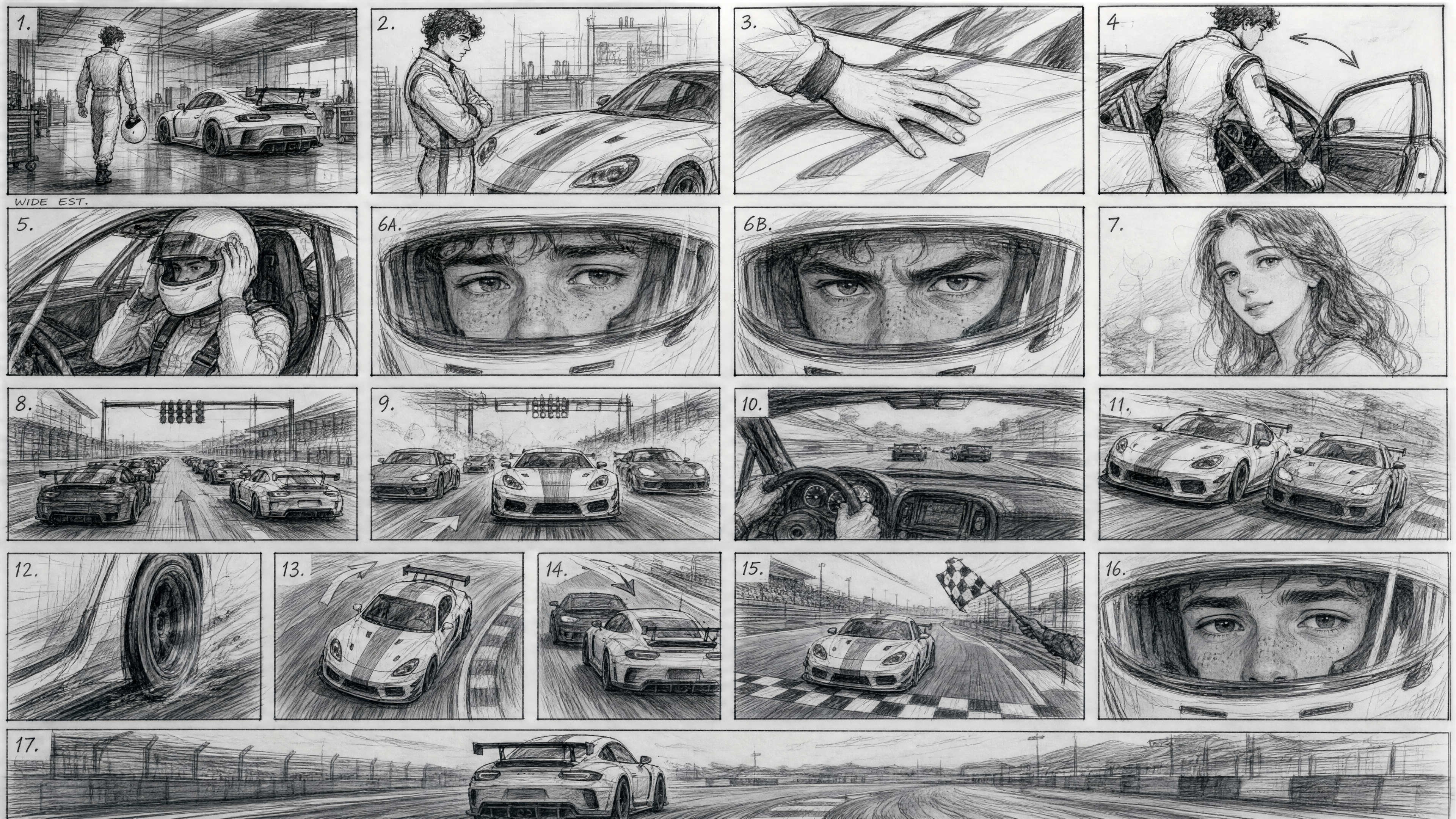
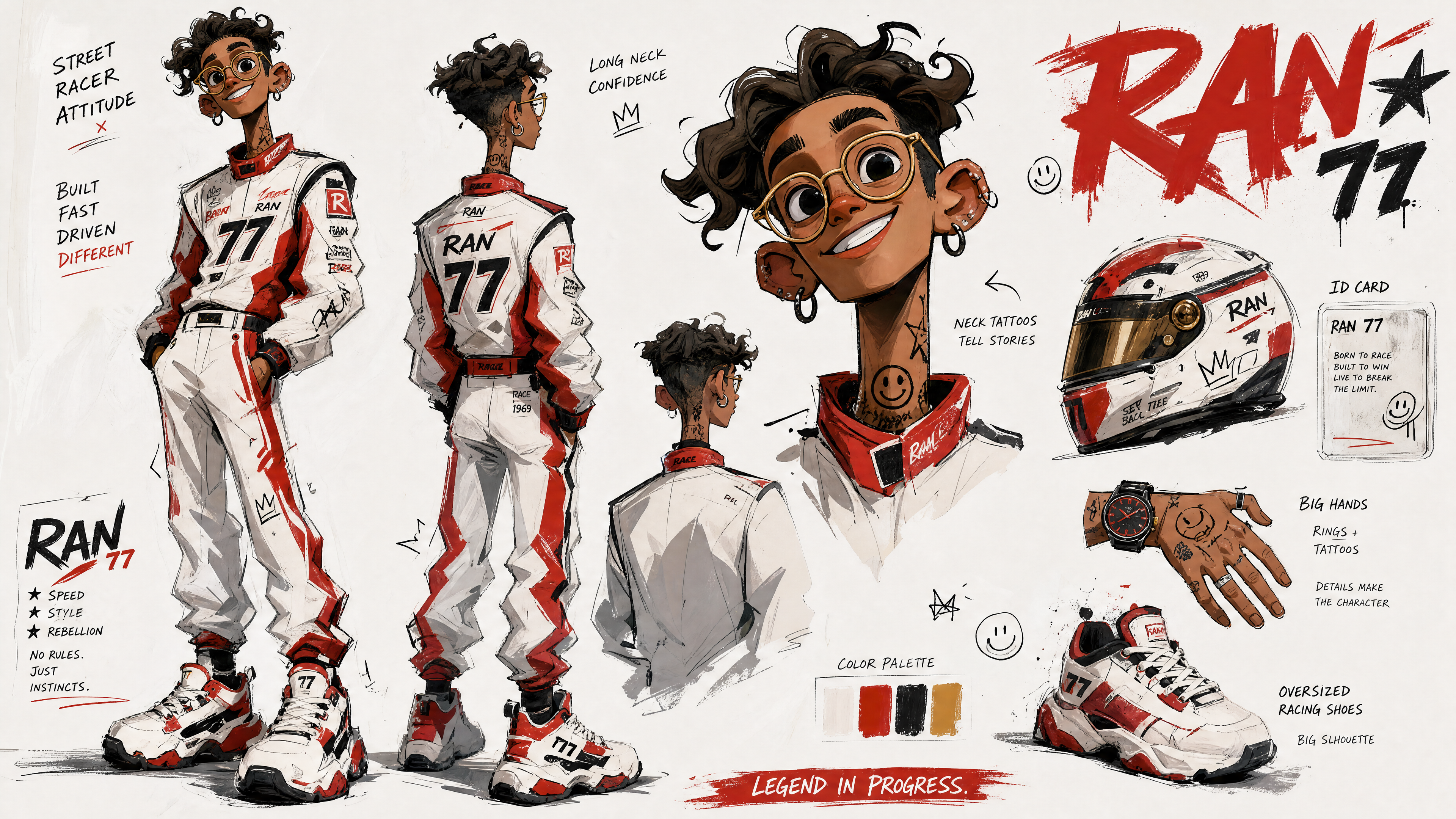
Tip: Lock your main character description (curly hair, freckles, strong eyebrows, white helmet) and your vehicle description (white and red modified track car) at this stage. You will reuse these exact phrases in later prompts to keep the look consistent.
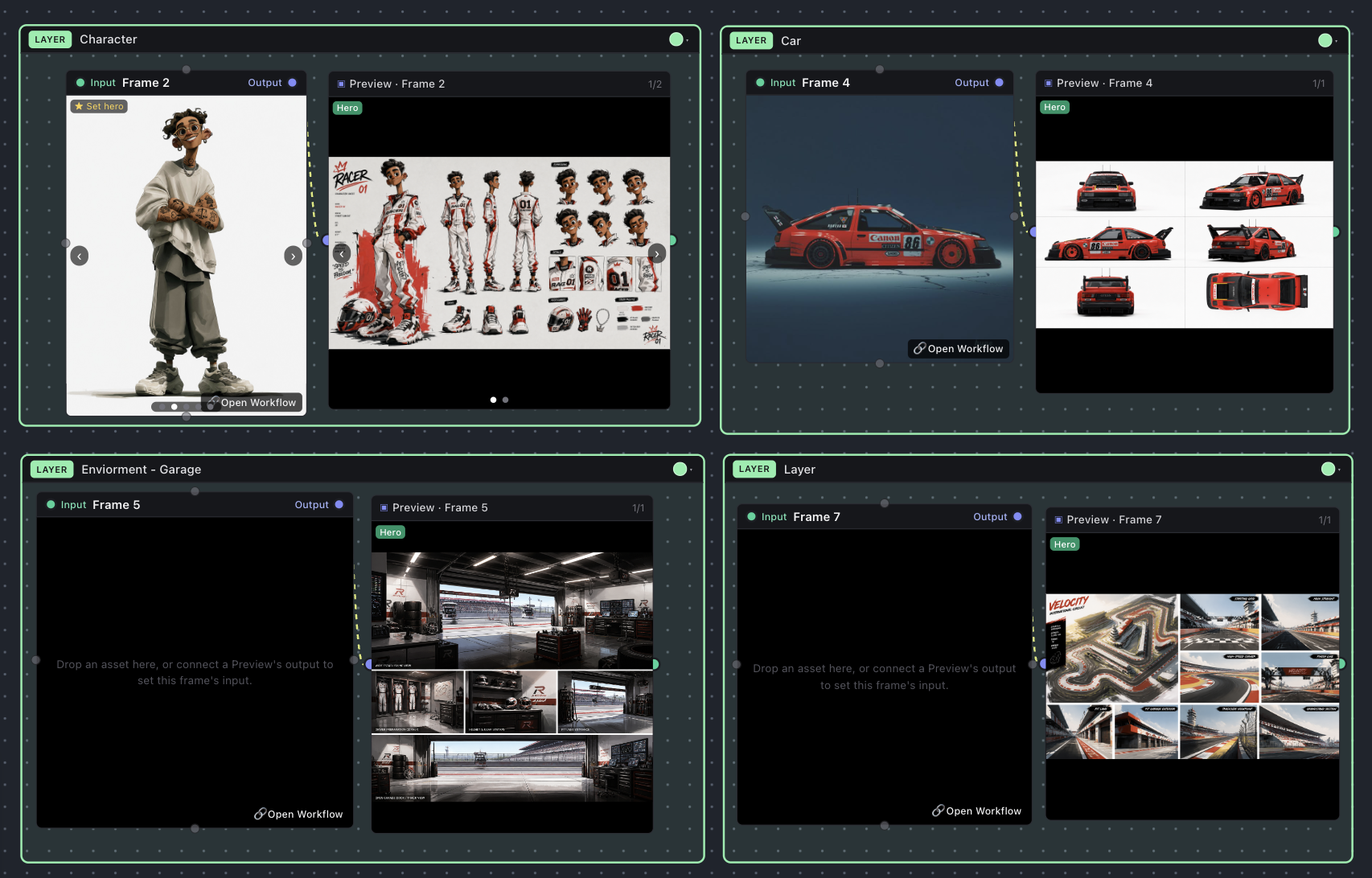
Step 2: Assets and Character Generation
With the storyboard approved, generate a clean reference sheet for your main character and key assets. These references anchor every shot so the driver and car stay visually consistent from panel 1 through the finish line.
Prompts
Included in workflows
Step 3: Shots Generation
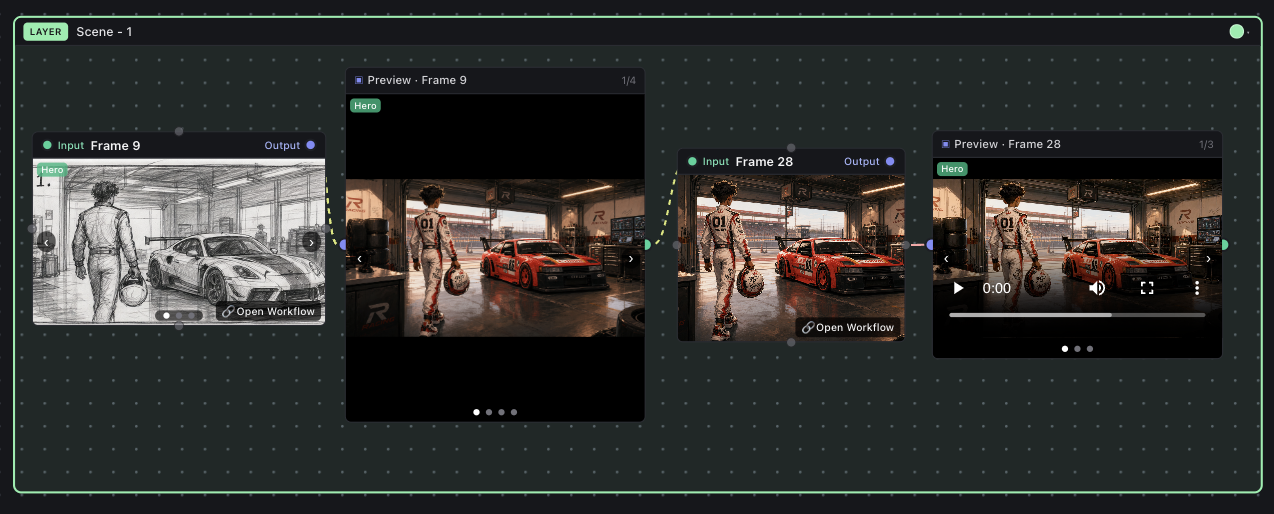
Now produce each shot. The process is identical for every panel in the storyboard:
- Take the storyboard panel as your input shot.
- Pass it through GPT text-to-image to produce a finished still.
- Feed that still into the LTX 2.3 image-to-video layer to animate it.
Repeating this loop across all 17 panels gives you your full set of clips.
Prompts
Included in workflows
Tip: Generate shots in storyboard order and review each clip before moving on. Catching a consistency drift early is far cheaper than re-rendering a batch later.
Step 4: Combine the Generated Videos
Once all shots are generated, import the clips into your preferred editor and assemble them in storyboard order. Trim each clip to its intended beat, set the pacing to hit the 20-second target, and add sound design or music to finish.
Workflows Used
- GPT-based image generation for all storyboard panels, character sheets, and per-shot stills.
- LTX 2.3 (open source) for image-to-video clip generation.
Recap
The core idea is a tight, repeatable loop: storyboard the whole film first, lock your character and asset references, then animate one shot at a time by turning each still into a clip. Keep your descriptions identical across steps, review as you go, and the final edit comes together cleanly.
Want the whole project?
Download the full Inline Studio project, prompts, frames, and takes included.