Characters
Consistent characters, without LoRA training
Build a character (.char file) once from a photo. Pick it on a FLUX.2 node and you get that person in whatever scene you prompt, without re-attaching reference images, describing their face, or training anything.
The references
Frontal
Profile
Generated from them, one prompt each
City street, low angle
Half body
Cafe window, overcast
Three-quarter
Lakeside, open water
Close portrait
Park, open shade
Half body
Street, mid-stride
Full body
Office, window light
Three-quarter
Rendered on FLUX.2 Klein 4B Base. The person is invented, not a real individual: a synthetic identity keeps the comparison honest, because a model that already knows a celebrity would score well whether the references worked or not.
Under the hood
How it actually works
Three stages. Encoding happens once on the CPU, applying happens on the GPU with every render, and scoring happens after each take.
01
Drop in a photo
One image is enough to start. The Characters panel takes a drag-and-drop, or you can turn any take you have already generated into a character.
02
It compiles a .char
Face detection, a curated reference set sized for the model, and an identity fingerprint, packed into one portable file in models/characters.
03
Pick it on a FLUX.2 node
A Character dropdown on the generation node, on FLUX.2 today. No wiring images, no re-attaching references, no describing their face in the prompt.
04
Every take is scored
Each render carries a continuity score out of 100 against the character, so drift is a number you can see rather than something you notice three shots later.
Compared
How this differs from PuLID, FaceID and img2img
These solve overlapping problems in genuinely different ways. The differences below are about mechanism, not which one wins.
| Approach | What binds the identity | Needs | Composition | Setup |
|---|---|---|---|---|
| PuLID · FaceID · InstantID | Face embedding, through a trained adapter | An adapter per base model | Free | Minutes |
| img2img | Denoises from your image | Nothing | Locked to the input | Instant |
| A LoRA per character | Fine-tuned weights | A dataset and a training run | Free | Hours |
| Characters | Your references, as tokens the model already reads | Nothing | Free | Seconds |
- img2img is the wrong tool rather than a worse one: the single strength dial controls identity and composition together, so you cannot have the same face in a different shot. FLUX.2 has no img2img path at all.
- An adapter carries a face embedding, so it brings the face without the hair, build or wardrobe around it. References carry whatever they show.
Guide
Making one that holds
1. Open the Characters panel
It is in the left rail of the Studio tab, beside Assets and Models. Drop an image straight onto the panel, or press the plus and pick from your library. A character you already generated a good take of can be saved directly from that take.
2. Name them, and write the description carefully
The description is prepended to every prompt that uses this character, so it should carry identifying traits and nothing else. Hair, build, a distinguishing mark. Not their outfit, not the setting, and not adjectives like “beautiful” which cost tokens and identify nobody.
3. Add angles if the first shots drift
The panel suggests one improvement at a time rather than a checklist. A profile and a three-quarter view are worth more than another frontal, and a reference that is not clearly the same person is flagged for you rather than silently averaged in.
4. Pick it on the node and prompt the scene
The Character dropdown is on FLUX.2 nodes today, in the node’s settings. Choose the character, then write prompts about framing, light and place. The references own the likeness, so describing the face again only fights them.
5. Read the score, then look at the image
Each take carries a continuity score. Use it to compare takes of the same character, not as a verdict on any one of them: the number is an aid, and the picture is the truth.
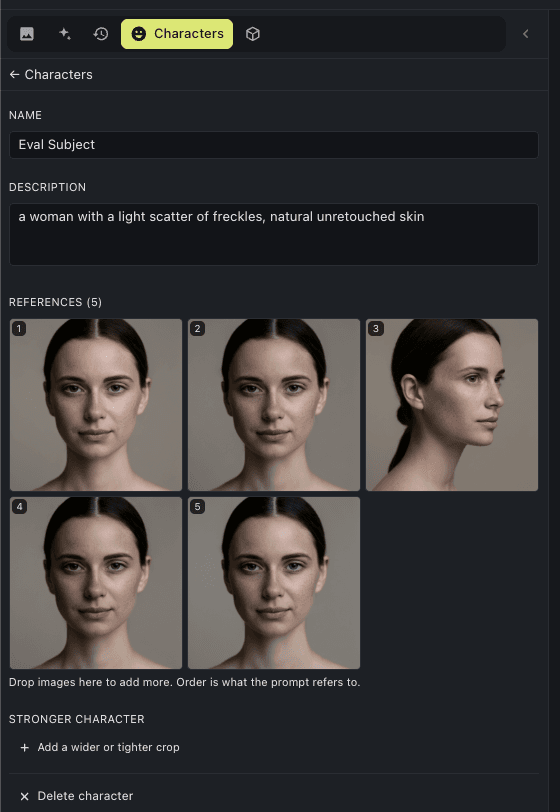
Vary the angle, not the person
A frontal, a three-quarter and a profile beat five near-identical frontals. Each reference is matched independently, so a new angle adds coverage instead of diluting an average.
Keep the set to one person
A reference that is not clearly the same face gets flagged when the character is built. Remove it, or the identity it introduces becomes reachable in your renders.
References cost render time
Each one rides along at every denoising step. Five references at 1024px roughly sextuple the work per step, so add them for coverage you actually need rather than by reflex.
Describe the scene, not the face
The references own the likeness. Prompts should carry framing, light and context: the description you locked into the character is prepended for you.
The file
A character is one portable file
It lands in models/characters as a zip. Copy it to another machine, hand it to someone else, or drop it back in. There is no account and nothing in a cloud.
refs/
Your original images, untouched. Everything else is derived from these.
text/
A short locked description, prepended to every prompt that uses the character.
payloads/
The reference set compiled for a model family. Pure cache: deleted and rebuilt whenever the sources change.
scoring/
The identity fingerprint each take is measured against.
Your references and description are the truth in that file. Everything else is cache: if the format moves on, the compiled parts are thrown away and rebuilt from your originals rather than migrated.
Honestly
What it does not do
- Scenes with several people are not solved. Put a character in a crowd and their face tends to spread onto the other people in frame, and the continuity score will not warn you: it finds one matching face and reports a good number. Use characters for shots built around one person until per-person conditioning exists.
- Face similarity is not identity. A close lookalike scores well; an identical twin would pass. The score compares takes, it does not assert who someone is.
- References cost render time. Five at 1024px roughly sextuple the tokens per denoising step, and attention does not scale linearly.
- There is no strength dial. FLUX.2 has no img2img path, so if a character overpowers a scene your levers are reference count and prompt, not a slider.
- One reference set, one person. A reference that is not clearly the same face is flagged when the character is built, because identity is matched against the closest reference rather than an average.
Questions
How is this different from PuLID or IP-Adapter FaceID?
Those inject a face embedding through a trained adapter, which is extra weights tied to one base model. A character uses FLUX.2's own multi-reference channel instead, so there is nothing to train and nothing to install, and the references carry hair, build and wardrobe rather than a face embedding alone.
Is this just img2img?
No. img2img noises your input and denoises from there, so the output inherits the input's composition. A character starts from pure noise and attends to the references as extra tokens, so the composition is completely free. FLUX.2 has no img2img path at all.
Do I still need to train a LoRA?
Not for consistency. A LoRA still binds harder and is worth it for a lead you will shoot hundreds of times, but a character takes seconds instead of hours and needs no dataset.
How many reference images do I need?
One is enough to start. Varied angles help more than more frontals, because each reference is matched independently rather than averaged. Every reference also adds tokens at every denoising step, so more is not free.
What is the continuity score?
A 0-100 measure of how closely a take matches the character, on every render. It blends a face match against your references with a whole-subject match, and falls back to the subject alone when no face is visible.
Does it work with more than one character in a shot?
Not yet. In a scene with several people the character's face tends to spread onto the others in frame, and the continuity score does not catch it, because it finds one matching face and reports success. Keep characters to shots built around one person for now.
Where does a character live?
One .char file in models/characters, next to your checkpoints. It is a zip you can copy between machines, share, or drop back in. Nothing is stored in a cloud.
Free and open source, running on your own GPU. New to the app? LoRA training covers the other way to bind a subject.